> ## Documentation Index
> Fetch the complete documentation index at: https://docs.suiet.app/llms.txt
> Use this file to discover all available pages before exploring further.
# Migrate from Ethos Wallet
> Guide to securely migrate Ethos Wallet to Suiet Wallet
Ethos Wallet is [sunsetting its services](https://x.com/EthosWalletXYZ/status/1833523221246677316), and you need to migrate your assets to a new wallet. This guide will help you migrate your assets from Ethos Wallet to Suiet Wallet.
## Migrate Guide
If you are using zkLogin(e.g. Google, GitHub signin), you assets may not be
able to recovered once Ethos Wallet sunsets. [Please transfer your assets to a
new wallet ASAP](#for-zklogin-wallets)
### For recover phrases and private key wallets
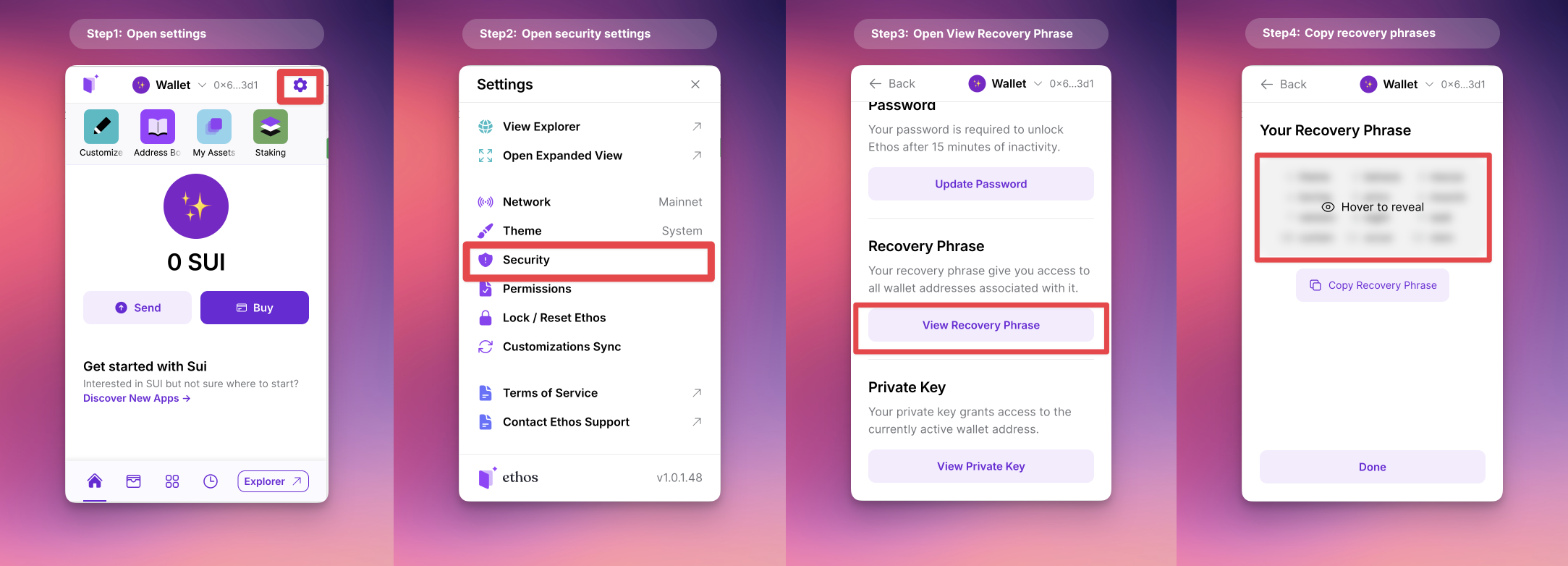 Open Ethos Wallet follow these steps(as image shows): 1. Open Settings 2. Open
Security settings 3. Open View Recovery Phrase 4. Copy or write down your recovery
phrases
> Skip this step if you've already installed Suiet Wallet These are
> instructions or content that only pertain to the second step.
Go to chrome web store and install Suiet Wallet: [Chrome Web Store](https://chromewebstore.google.com/detail/suiet-sui-wallet/khpkpbbcccdmmclmpigdgddabeilkdpd)
Open Ethos Wallet follow these steps(as image shows): 1. Open Settings 2. Open
Security settings 3. Open View Recovery Phrase 4. Copy or write down your recovery
phrases
> Skip this step if you've already installed Suiet Wallet These are
> instructions or content that only pertain to the second step.
Go to chrome web store and install Suiet Wallet: [Chrome Web Store](https://chromewebstore.google.com/detail/suiet-sui-wallet/khpkpbbcccdmmclmpigdgddabeilkdpd)
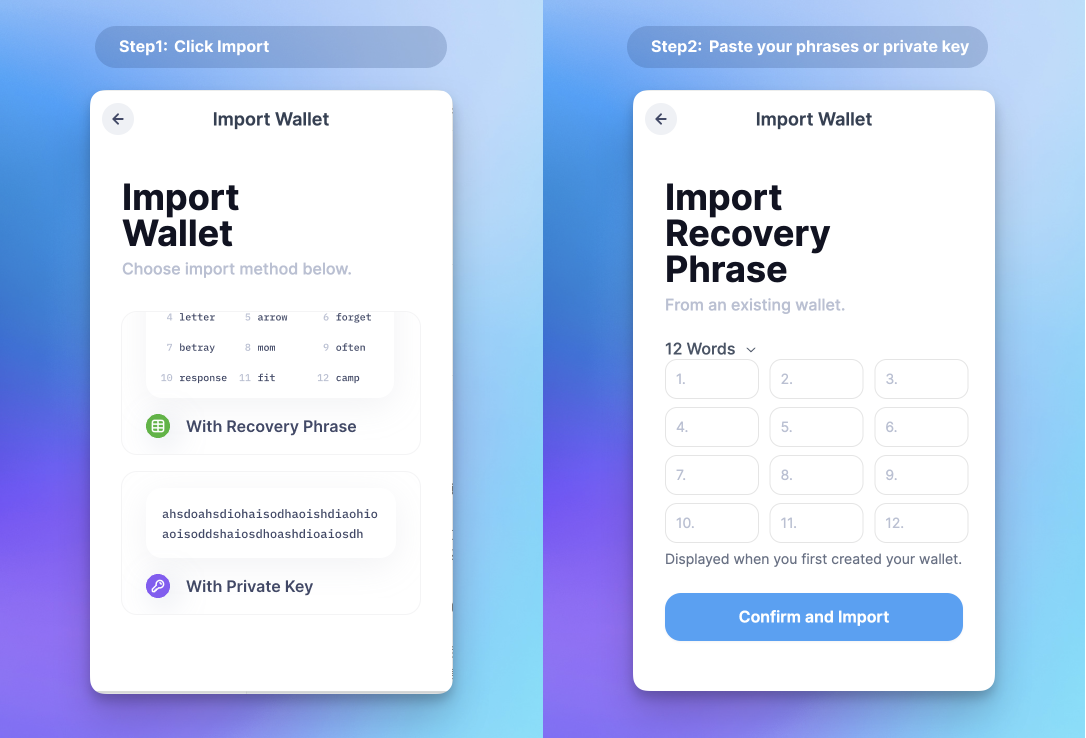 Open Suiet Wallet follow these steps(as image shows):
1. Click import
2. Enter your recover phrases or private key and submit
### For zkLogin wallets
If you're using zkLogin (such as Google, GitHub, etc.) with Ethos Wallet, **you'll lose access to your wallet once Ethos Wallet sunsets**. For a detailed explanation of how this works, please refer to the [zkLogin 101](https://docs.suiet.app/wallet/tutorial/zklogin-101#zklogin-wallet) documentation. Currently, the only solution is to transfer your assets to a new wallet as soon as possible.
> We're actively communicating with Mysten Labs and Ethos Wallet to explore alternative solutions that could prevent this issue.
You can create a new wallet on Suiet to obtain your wallet address as image shows.
If you still want to use zkLogin wallet, you can try zkLogin wallets like [Stashed
Wallet](https://getstashed.com/)
Open Suiet Wallet follow these steps(as image shows):
1. Click import
2. Enter your recover phrases or private key and submit
### For zkLogin wallets
If you're using zkLogin (such as Google, GitHub, etc.) with Ethos Wallet, **you'll lose access to your wallet once Ethos Wallet sunsets**. For a detailed explanation of how this works, please refer to the [zkLogin 101](https://docs.suiet.app/wallet/tutorial/zklogin-101#zklogin-wallet) documentation. Currently, the only solution is to transfer your assets to a new wallet as soon as possible.
> We're actively communicating with Mysten Labs and Ethos Wallet to explore alternative solutions that could prevent this issue.
You can create a new wallet on Suiet to obtain your wallet address as image shows.
If you still want to use zkLogin wallet, you can try zkLogin wallets like [Stashed
Wallet](https://getstashed.com/)
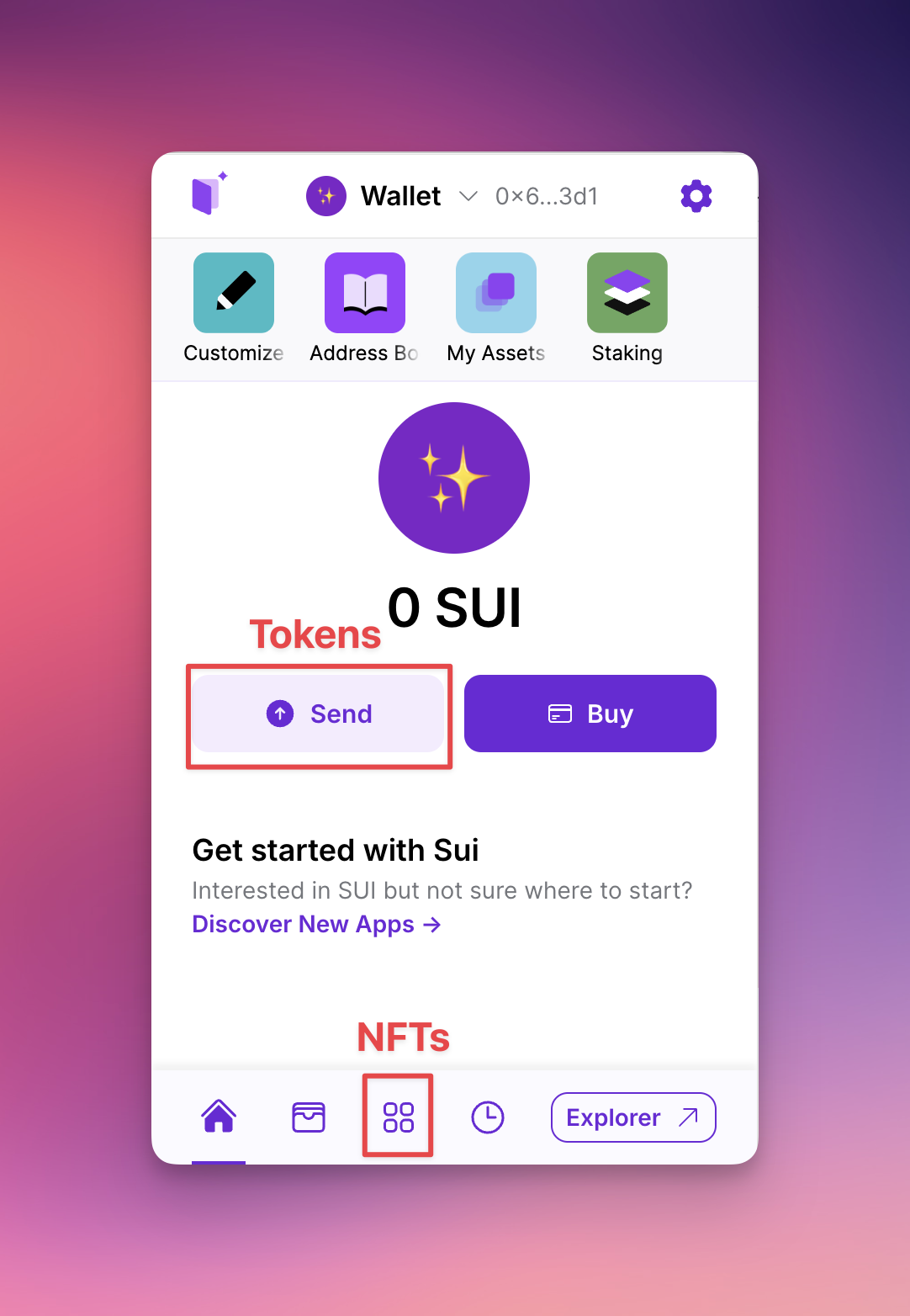 For every asset you have in Ethos Wallet, you can send them to your new wallet(the
address from your previous step)
Yes, your Soul Bound NFTs are not able to transfer 😭
After you've sent all your assets, you can check your new wallet to confirm that
For every asset you have in Ethos Wallet, you can send them to your new wallet(the
address from your previous step)
Yes, your Soul Bound NFTs are not able to transfer 😭
After you've sent all your assets, you can check your new wallet to confirm that